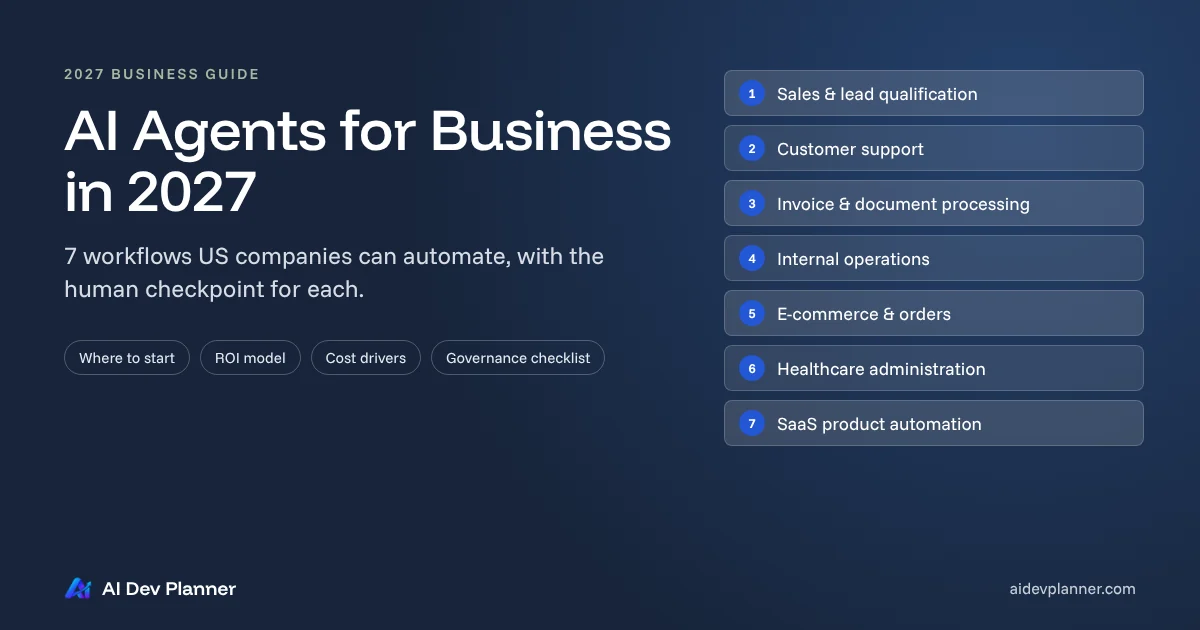
AI Agents for Business in 2027: 7 Workflows US Companies Can Automate
See 7 workflows US companies can automate with AI agents in 2027, plus how to pick the first one, estimate ROI and cost, and keep humans in control.
Obaid Tariq
23 min read
Table of Contents (12 sections)▼
Most US businesses are still early with AI. In the Census Bureau's Business Trends and Outlook Survey, between 17% and 20% of US firms reported using AI in any business function in the two weeks before they answered, across survey rounds from December 2025 to May 2026. Among firms with 250 or more employees, the figure was 37% (US Census Bureau, May 2026).
The companies that are moving are going past chat. In McKinsey's 2026 global survey, 40% of respondents at organizations with more than $1 billion in revenue said they are scaling AI agents, up from 27% a year earlier. At smaller organizations the figure held at 22% (McKinsey, August 2026).
There's a catch. Gartner predicts that more than 40% of agentic AI projects will be canceled by the end of 2027 because of escalating costs, unclear business value or inadequate risk controls (Gartner, June 2025). So the useful question for 2027 isn't "should we use AI agents for business?" It's "which workflow, with which controls, and how will we know it paid off?"
This guide answers that question for US founders, operators and technology leaders. It covers:
Seven workflows that suit AI agents today, each with the step where a human must stay involved
How to choose the first one
How to estimate ROI and cost
The governance that keeps an agent from becoming a liability
Who this is for: business owners, SaaS founders, COOs, CTOs and operations managers evaluating AI automation. If you want the engineering detail behind agents (function calling, state and memory), read our engineering deep dive on autonomous agents.
What are AI agents for business?
Definition: An AI agent for business is software that uses a large language model (LLM) to pursue a defined goal across several steps. It reads the situation, decides which approved tool to use next (a CRM, ERP, inbox, database or API), takes that action, checks the result, and either finishes, tries again or hands off to a person.
OpenAI describes agents as systems that "independently accomplish tasks on your behalf." The LLM decides when the task is done and corrects course if needed, within the boundaries you set (OpenAI, A practical guide to building agents).
In practice, a business agent has five parts:
A goal. For example, "Qualify this inbound lead and book a call if it fits."
Tools. Specific, permissioned actions, such as lookup_company, update_crm_record or create_calendar_hold.
Context. Your policies, product data, past tickets and the current record.
Guardrails. Limits on steps, spend and data access, validation of every output, and blocked actions.
A human checkpoint. A defined point where a person approves, edits or takes over.
That last part matters most. An agent that can do anything is a risk, not a business tool.
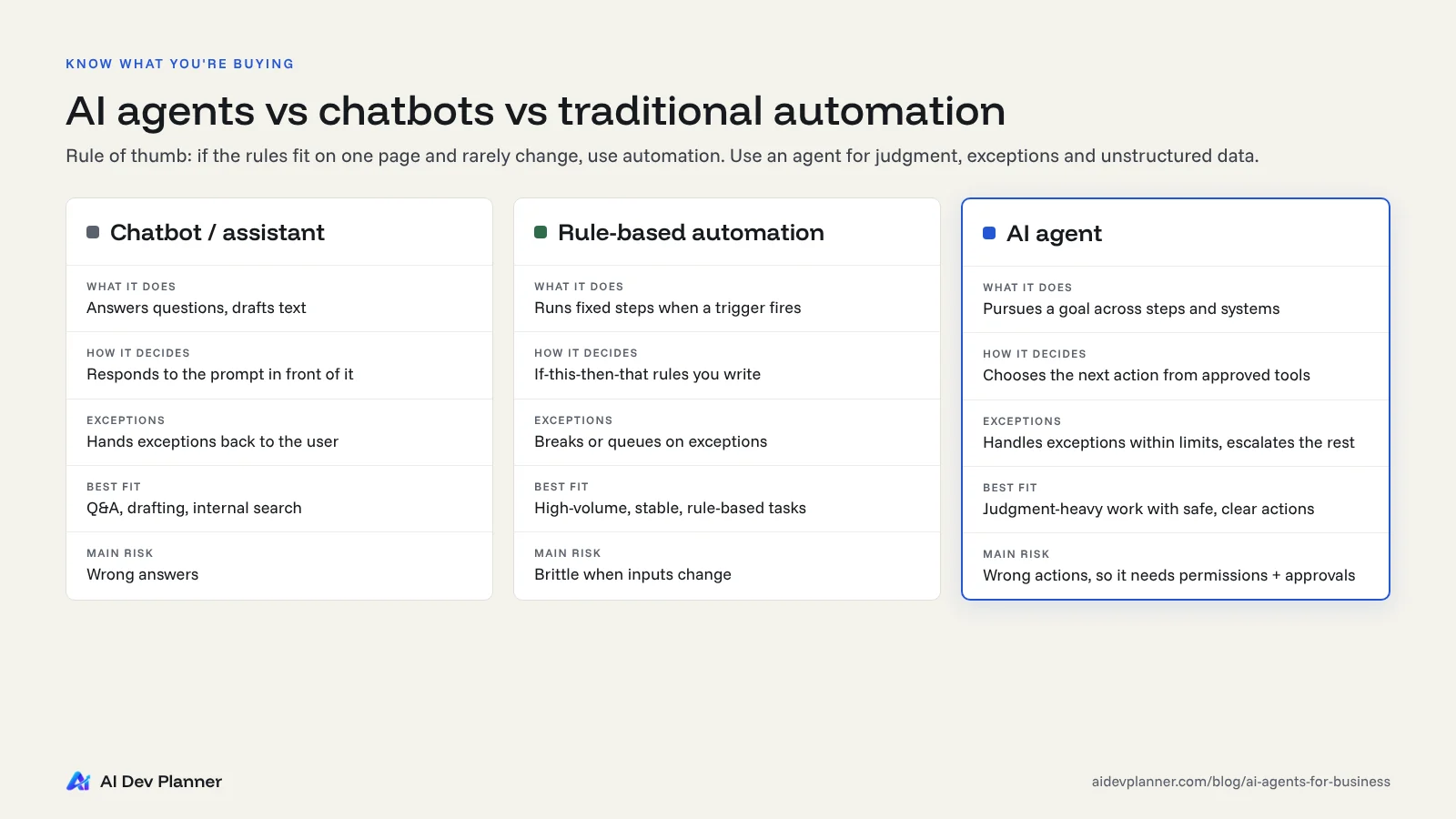
AI agents vs chatbots vs traditional automation
Agents are not a replacement for every automation you already run. Anthropic draws a useful line between the two:
Workflows are systems where LLMs and tools are orchestrated through "predefined code paths."
Chooses the next action from approved tools, based on context
Handles exceptions?
Rarely. Hands back to the user
No. Breaks or routes to a queue
Yes, within limits, and escalates the rest
Works with unstructured data
Reads it
Poorly
Reads, extracts and acts on it
Best for
Q&A, drafting, internal search
High-volume, stable, rule-based tasks
Judgment-heavy tasks with clear goals and safe actions
Main risk
Wrong answers
Brittle when inputs change
Wrong actions, so it needs permissions, validation and approvals
Rule of thumb
If the rules fit on one page and rarely change, use traditional AI workflow automation. It's cheaper and more predictable.
Use an agent when the work involves the three conditions OpenAI's guide highlights:
Nuanced judgment or exceptions
Rule sets that have become hard to maintain
Heavy reliance on unstructured data, such as emails, PDFs and conversations
Be skeptical of products that are agents in name only. Gartner warns of "agent washing," where assistants, RPA tools and chatbots are rebranded without real agentic capabilities. It estimates that only about 130 of the thousands of agentic AI vendors are real.
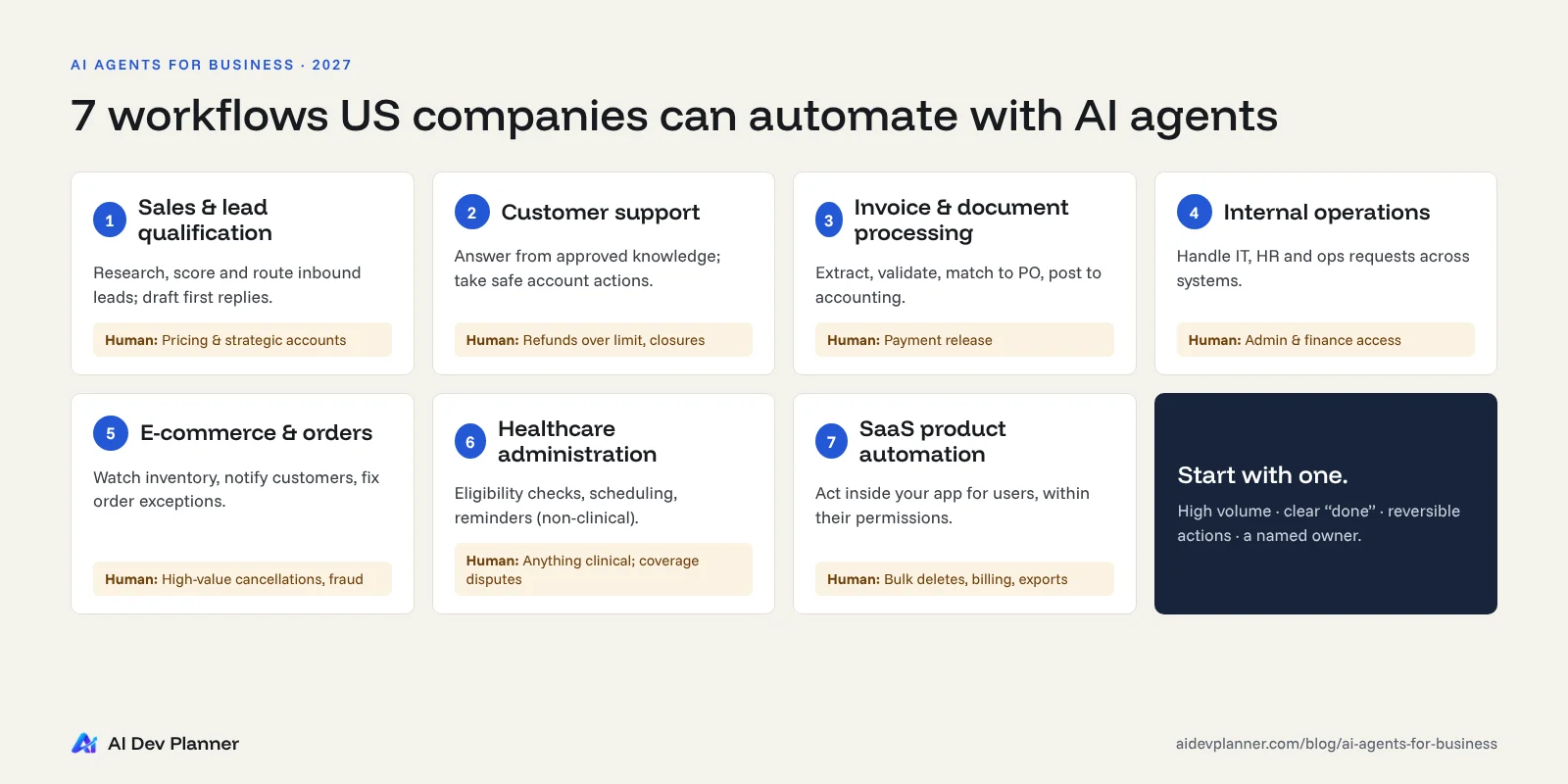
7 business workflows US companies can automate with AI agents
Each of the seven workflows below suits AI agents for business automation in 2027, because it combines volume, unstructured inputs and a clear definition of "done." For each one you'll see:
The workflow, step by step
What the agent does and what stays with a person
What to measure
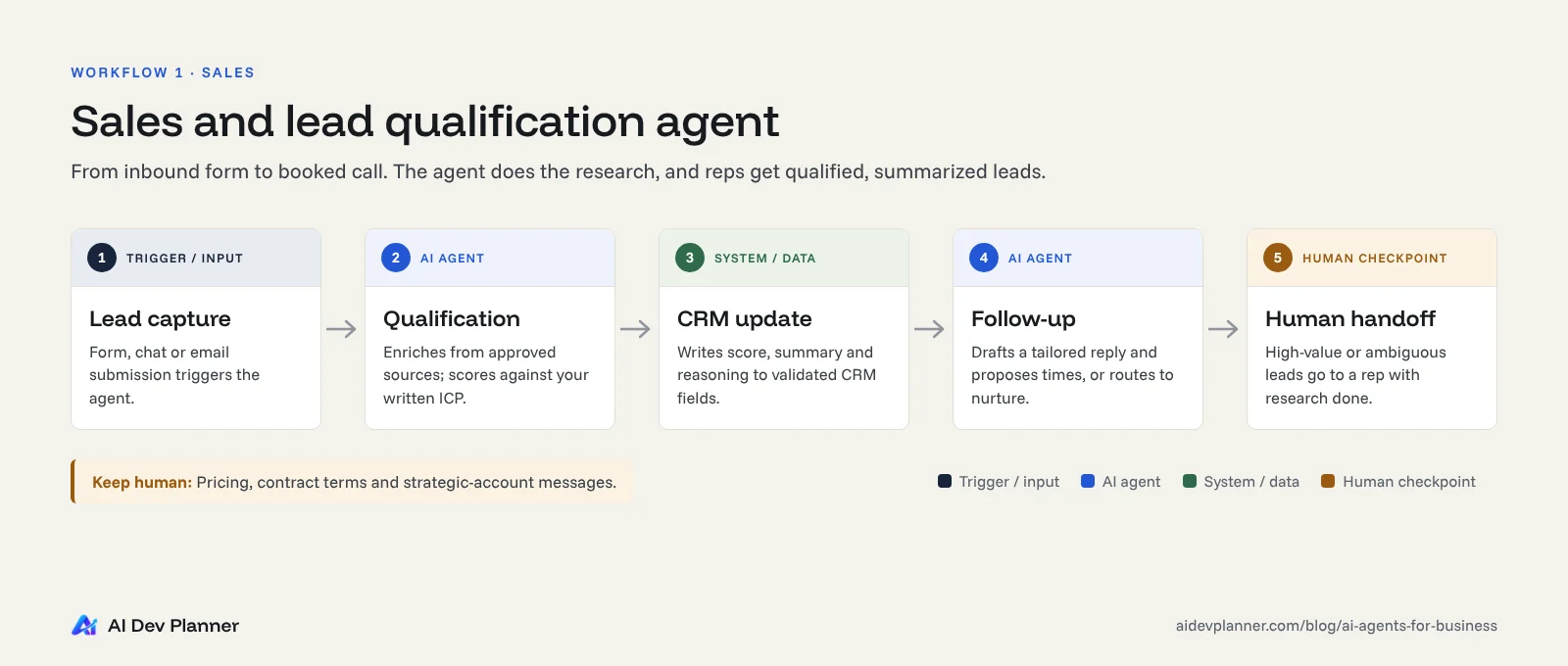
1. Sales and lead qualification
The problem:
Inbound leads arrive through forms, chat, email and events.
Sales reps spend hours researching companies, checking fit, updating the CRM and writing first replies.
Good leads often wait a day or more for a first response.
The agent workflow:
Capture: a new form submission or email triggers the agent.
Qualify: the agent enriches the record from approved data sources and scores it against your written ideal-customer criteria (industry, size, budget signals, use case).
Update the CRM: it writes a structured summary, score and reasoning to the lead record, using validated fields, not free text in random places.
Follow up: for qualified leads, it drafts a personalized reply and proposes meeting times. For poor-fit leads, it sends a polite resource email or routes the lead to nurture.
Human handoff: high-value or ambiguous leads go to a rep with the research already done.
Keep human: pricing promises, contract terms, and any outbound message to a strategic account. These should be reviewed before sending.
Measure:
Time to first response
Share of leads auto-qualified correctly (spot-checked weekly)
Meetings booked per rep hour
2. Customer support and service operations
The problem:
Ticket volume grows faster than headcount.
Many questions repeat, but each one still needs looking up order data, account status or policy details.
The agent workflow:
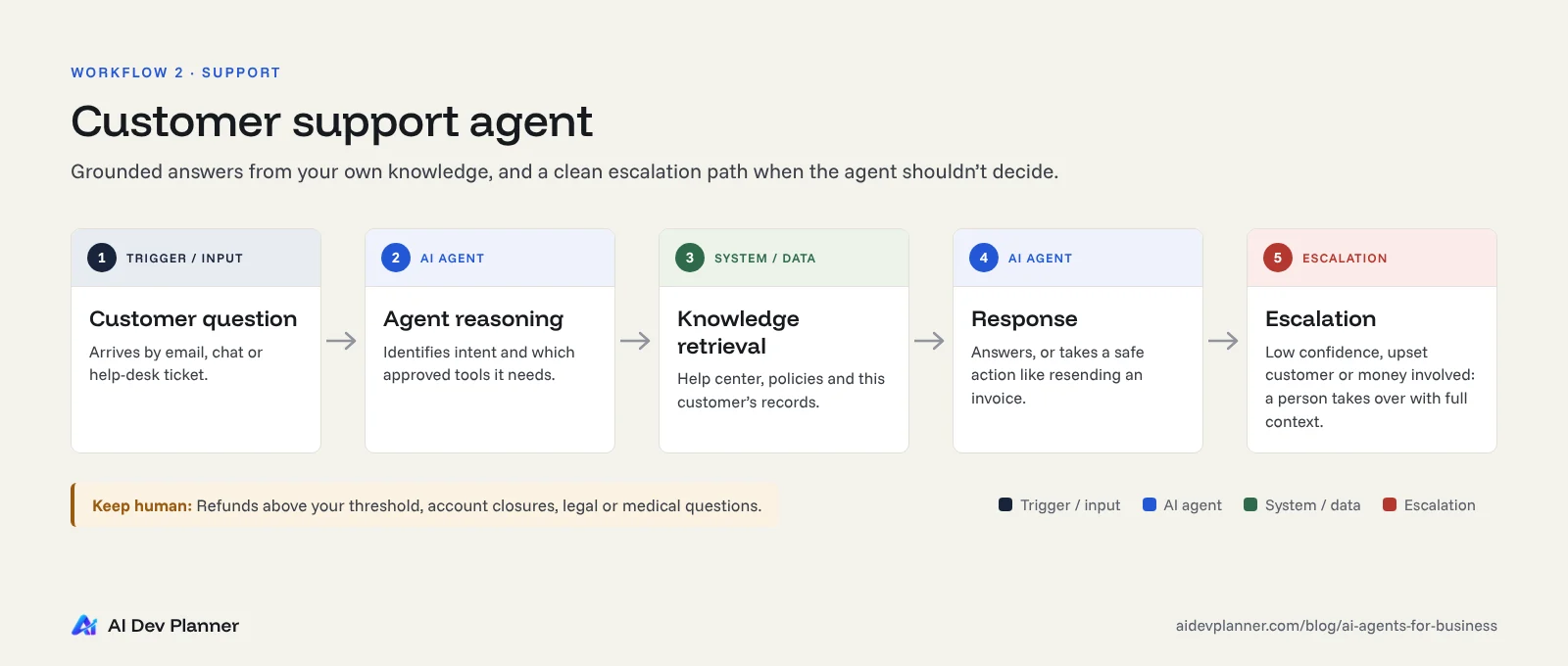
A customer question arrives by email, chat or the help desk.
The agent reasons about intent and checks which tools it needs, such as order status or account lookup.
It retrieves knowledge from your approved help center, policies and the customer's own records.
It responds with a grounded answer, or performs a safe action, such as resending an invoice or updating a shipping address before fulfillment.
It escalates to a person when confidence is low, the customer is upset, or the request involves money or exceptions to policy. The full context goes with it.
Keep human:
Refunds above a threshold you set
Account closures
Legal or medical questions
Anything the customer explicitly asks a person to handle
OpenAI's guide names large refunds and payments as typical high-risk actions that should trigger human review.
Measure:
Resolution rate without reopen
Escalation accuracy
Customer satisfaction on agent-handled tickets, compared with human-handled ones
Cost per resolved ticket
3. Invoice and document processing
The problem:
Accounts payable teams retype data from PDFs and emails.
They match it to purchase orders and chase approvals.
Errors show up later as duplicate payments or late fees.
The agent workflow:
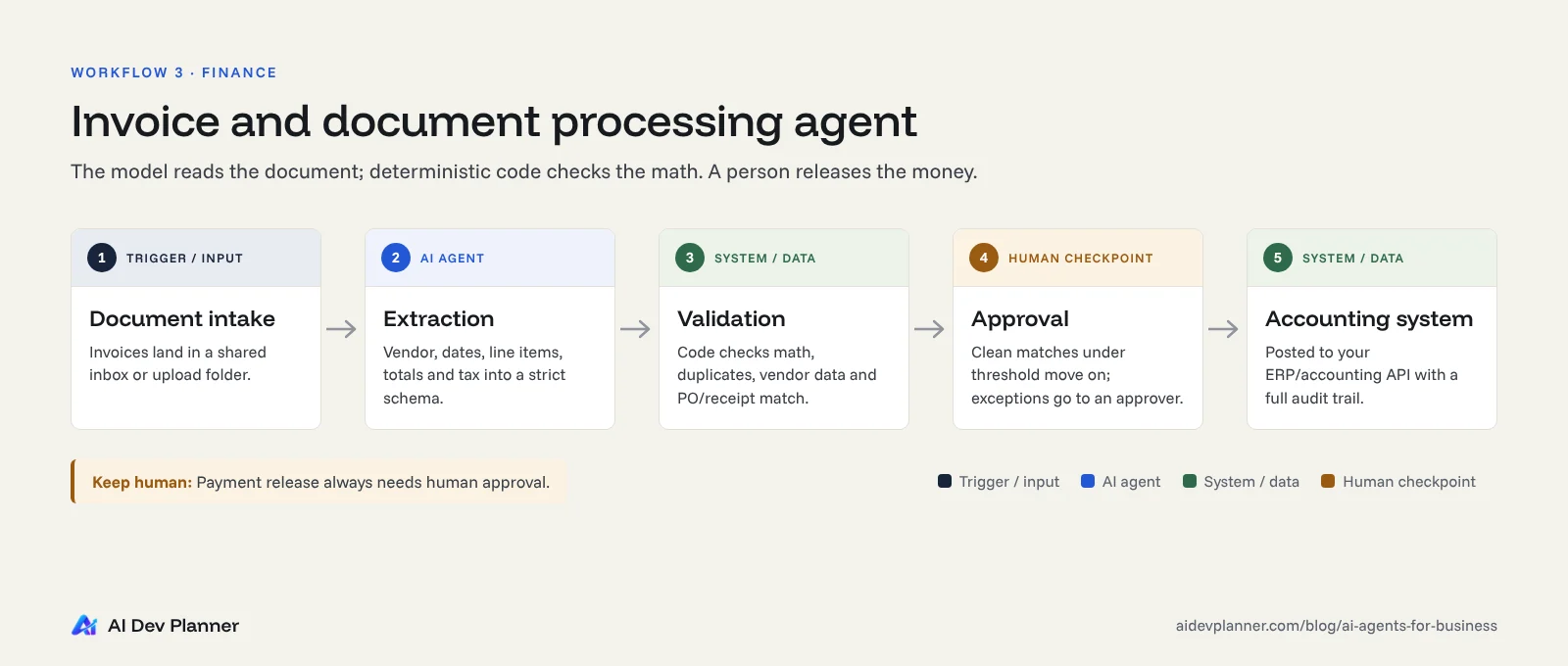
Intake: invoices arrive in a shared inbox or upload folder.
Extraction: the agent reads each document and extracts the vendor, invoice number, dates, line items, totals and tax into a strict schema.
Validation: deterministic code, not the model, checks the math. It also checks for duplicates, vendor master data and a match to the purchase order and receipt.
Approval: clean matches under your threshold move forward. Mismatches and amounts above the limit go to the right approver with a summary of what's wrong.
Accounting system: approved invoices are posted to your ERP or accounting software, such as QuickBooks, NetSuite or Xero, through its API, with an audit trail.
Keep human: payment release. In PwC's 2025 survey of 308 US executives, financial transactions were the area where respondents trusted agents least (20%) (PwC, May 2025). Let the agent prepare the payment, and let a person approve it.
Measure:
Straight-through processing rate
Extraction accuracy by field
Exceptions per 100 invoices
Days to approve
4. Internal operations and employee requests
The problem:
IT, HR and operations teams field the same requests every week: access to an app, a new laptop, a policy question, a PTO balance, a vendor onboarding form.
Each request touches two or three systems.
The agent workflow:
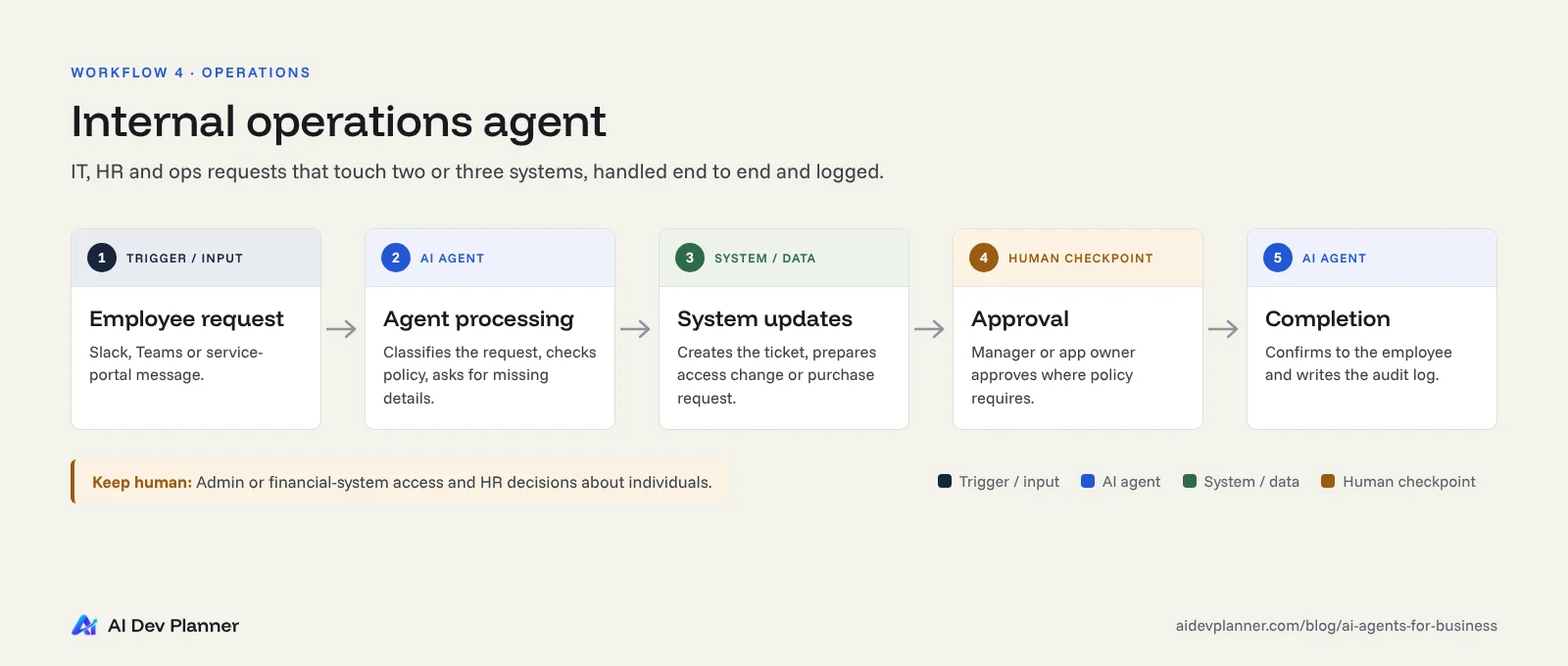
An employee request arrives in Slack, Teams or a service portal.
The agent processes it: identifies the request type, checks policy and gathers missing details.
It makes system updates: creates the ticket, prepares the access change, drafts the purchase request.
It routes for approval where policy requires it, for example from the manager or app owner.
It closes the loop on completion, telling the employee what was done and logging it.
McKinsey's 2026 survey found that respondents most often report scaling agents in IT, knowledge management and software engineering. Internal requests are a common, lower-risk place to start, because the users are your own staff. If your current tools can't support this, a focused internal tools layer is often the missing piece.
Keep human: granting admin or financial-system access, and HR decisions about individuals.
Measure:
Time to fulfill a request
Share of requests completed without manual touch
Policy exceptions caught
5. E-commerce and order management
The problem:
Order issues come from everywhere: stock mismatches, address errors, delayed shipments and "where is my order?" messages.
Each one needs data from the store, the inventory system and the carrier.
The agent workflow:
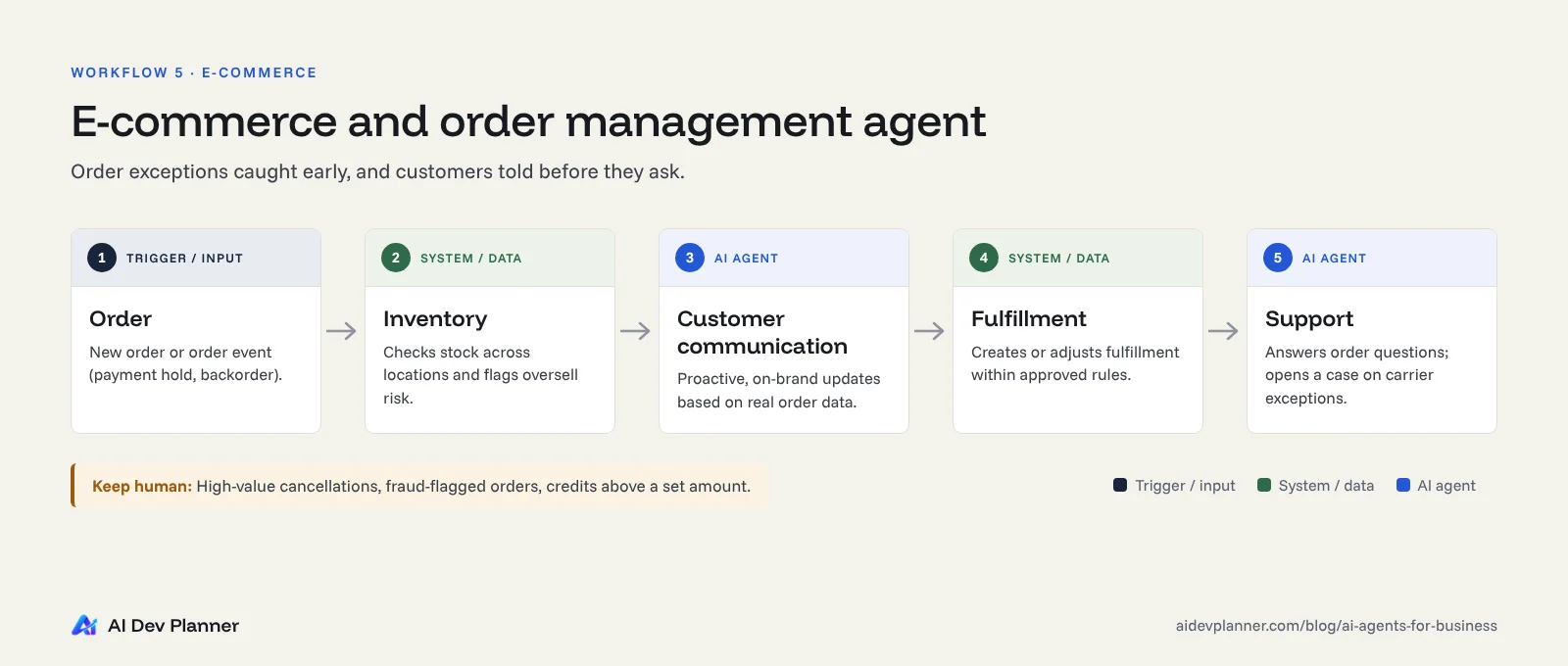
Order: a new order, or an order event such as a payment hold or a backorder, triggers the agent.
Inventory: the agent checks stock across locations and flags oversell risk.
Customer communication: it sends proactive updates on delays, split shipments or address problems, written in your brand voice and based on real order data.
Fulfillment: it creates or adjusts fulfillment requests within rules you approve, such as choosing the nearest warehouse.
Support: it answers order questions with tracking data and opens a case when a carrier exception occurs.
Keep human:
Cancellations of high-value orders
Fraud-flagged orders
Discounts or credits above a set amount
Stores that need these actions inside a custom storefront or back office usually pair the agent with e-commerce development work on their order APIs.
Measure:
"Where is my order?" contacts per 1,000 orders
Time to notify customers of a delay
Oversell incidents
6. Healthcare administration
The problem:
US healthcare carries a heavy administrative load.
The 2025 CAQH Index estimated that more than $20 billion a year could still be saved by moving remaining manual administrative transactions, such as eligibility checks and prior authorizations, to electronic workflows. Medical accounts for $18.7 billion of that (AJMC report on the 2025 CAQH Index, May 2026).
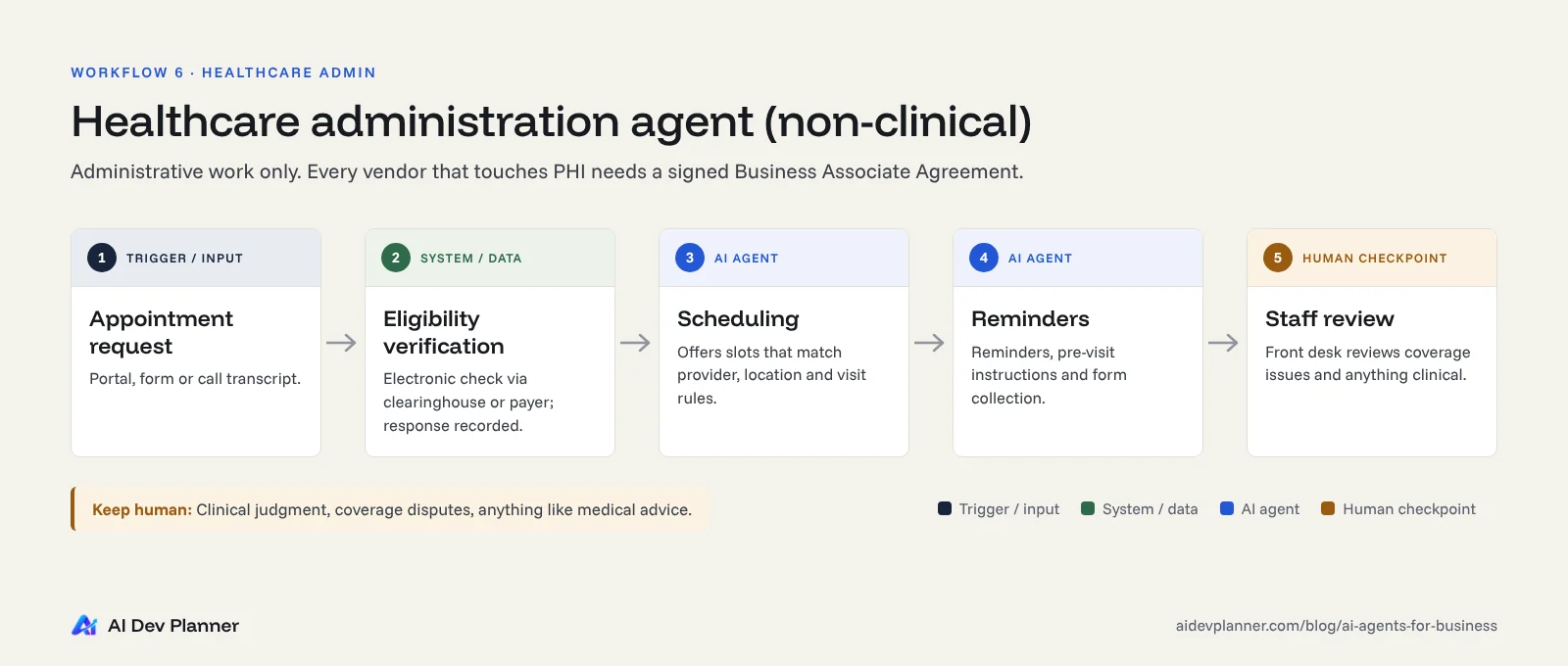
The agent workflow (administrative only, not clinical):
Appointment request: a patient asks for an appointment through the portal, a form or a call transcript.
Eligibility verification: the agent runs an electronic eligibility check through your clearinghouse or payer connection and records the response.
Scheduling: it offers slots that match provider, location and visit-type rules.
Reminders: it sends reminders and pre-visit instructions, and collects forms.
Staff review: front-desk staff review coverage issues, unusual requests and anything clinical before the visit.
Keep human:
Any clinical judgment
Coverage disputes
Prior authorization submissions with clinical content
Any message that could be read as medical advice
Compliance note:
Agents that create, receive or store protected health information must run on vendors that will sign a Business Associate Agreement. HHS states that a cloud service provider handling ePHI for a covered entity is a business associate (HHS).
Confirm BAA coverage for the model provider, hosting and logging, not just your EHR.
The problem: SaaS users want outcomes, not more settings pages. Product teams are adding agents that act inside the product for the user, such as:
"Set up my workspace like last quarter's"
"Find accounts at risk of churn and draft outreach"
"Reconcile these two reports"
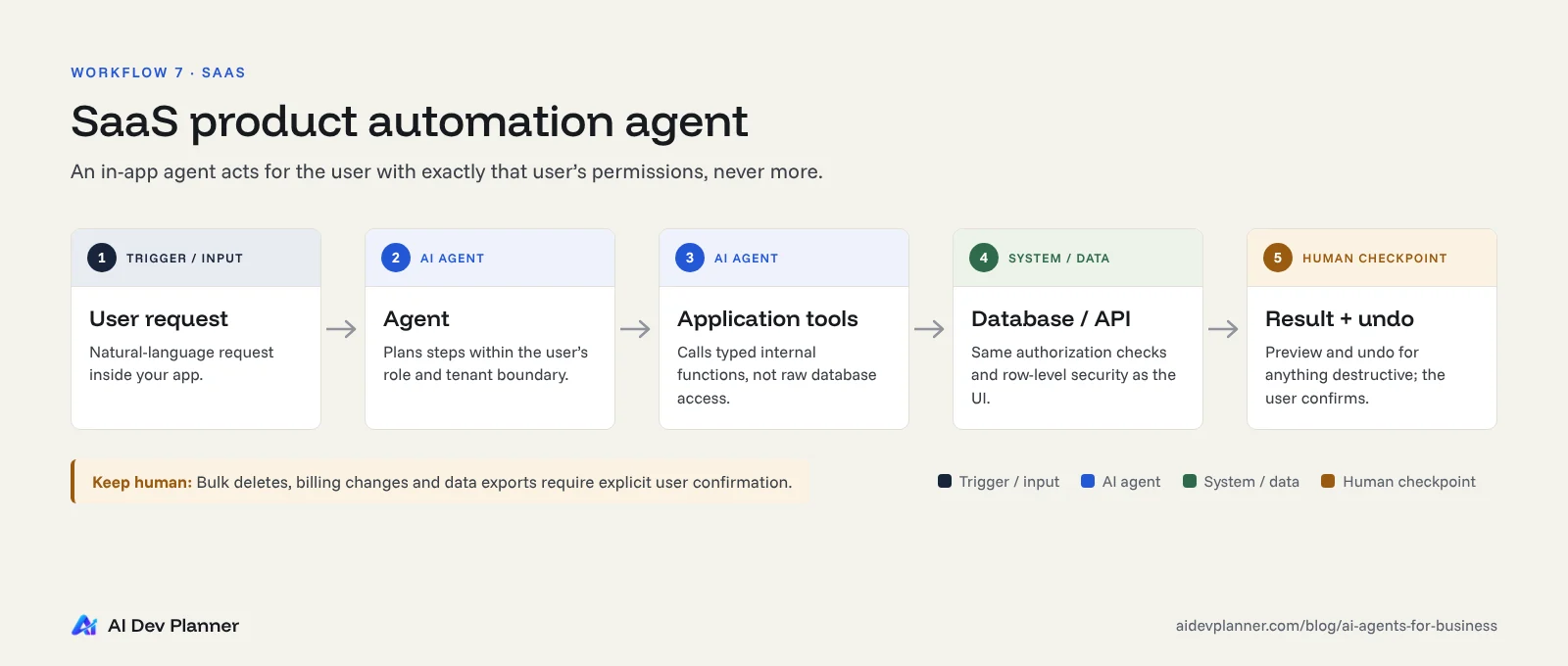
The agent workflow:
A user request arrives in natural language inside your app.
The agent plans the steps within that user's permissions and tenant boundary.
It calls application tools: your own typed internal functions, not raw database access.
Those tools read and write through your database or API, with the same authorization checks as the UI.
The result is shown to the user, with a preview and an undo option for anything destructive.
Gartner predicts that 33% of enterprise software applications will include agentic AI by 2028, up from less than 1% in 2024. That's a forecast, not a measured result, but it explains why SaaS roadmaps are moving this way.
Keep human:
Bulk deletes
Billing changes
Data exports
Anything that crosses tenants (which should be impossible by design)
This is where multi-tenant SaaS architecture and agent design meet. Row-level security and per-tenant tool permissions are not optional.
Measure:
Task success rate
Undo rate
Feature adoption
Support tickets created by agent actions
Which business processes should you automate first?
The most common failure isn't a weak model. It's picking the wrong first workflow. Score each candidate from 1 to 5 on the criteria below, and start with the highest total.
Criterion
Score high (5) when…
Score low (1) when…
Volume
Hundreds or thousands of cases a month
A few cases a month
Clear "done"
Success can be checked objectively, for example "invoice posted and matched"
Success is subjective
Unstructured input
Emails, PDFs, chats or free-text forms
Already clean, structured data, where plain automation is fine
Reversible actions
Mistakes can be caught and undone cheaply
Mistakes are costly or irreversible
Data and system access
APIs exist, and the data is reasonably clean
Data is scattered and access is manual
Owner
A named process owner will review results weekly
No one owns the outcome
A practical first choice for most companies is a high-volume internal or back-office workflow with reversible actions. Invoice intake, internal requests and lead research usually score well. Customer-facing autonomous actions come second, once you've proven accuracy.
AI automation for small businesses
Census data shows a clear size gap:
Firms with 250 or more employees reported AI use at 37%.
Under 20% of firms with four or fewer employees did.
Between December 2025 and May 2026, use didn't change significantly among firms with fewer than 20 employees.
For a small business, the best entry point is usually one narrow workflow attached to tools you already pay for, such as your inbox, CRM and accounting software, not a platform rebuild. If you need something lightweight and custom, look at small business software built around that one workflow.
How to estimate the ROI of an AI agent
Evidence of returns is still mixed:
In McKinsey's 2026 survey, 37% of respondents attributed at least some EBIT impact to AI, essentially unchanged from 2025.
In PwC's 2025 survey, 66% of executives at companies adopting agents reported higher productivity and 57% reported cost savings. Those figures are self-reported, not audited.
Your own numbers matter more than industry averages. Use a simple model:
Monthly net benefit = (hours saved × loaded hourly cost) + value of faster or better outcomes − (model usage + hosting + monitoring + maintenance)
Payback period (months) = one-time build cost ÷ monthly net benefit
Worked example (illustrative assumptions, not a benchmark)
Input
Assumption
Invoices per month
2,000
Manual handling time per invoice
8 minutes
Loaded labor cost
$40/hour
Share processed straight through after launch
70%
Review time for the remaining 30%
4 minutes each
Spot-check of 5% of automated invoices
2 minutes each
Monthly run cost (model usage, hosting, monitoring)
$600
Monthly maintenance (10 hours at $100)
$1,000
Calculation:
Before: 2,000 × 8 min = 266.7 hours a month
After:
Review: 600 invoices × 4 min = 40.0 hours
Spot-checks: 70 invoices × 2 min = 2.3 hours
Total: 42.3 hours a month
Hours saved: 224.3 a month × $40 = $8,973
Monthly net benefit: $8,973 − $1,600 = $7,373
Payback: each $50,000 of build cost pays back in about 6.8 months
This example leaves out benefits that are real but harder to price, such as fewer late fees, caught duplicates and faster supplier approvals. It also leaves out risks: an accuracy rate below 70% stretches payback quickly.
Run the pilot to measure your real straight-through rate before you commit to the full build.
What does custom AI agent development cost?
There is no honest single price for an agent. The cost depends on a handful of drivers, so ask any vendor to break a quote down along these lines.
Cost driver
Lower cost when…
Higher cost when…
Number of tools and integrations
1–3 systems with modern APIs
Many systems, legacy software or no APIs
Data readiness
Clean, accessible records and documents
Scattered, inconsistent or scanned data
Autonomy level
Drafts and recommendations with human approval
Autonomous actions that need extensive safeguards
Security and compliance
Internal, non-sensitive data
PHI, payment data, SOC 2 or audit requirements
Evaluation and testing
One task type with a clear pass/fail
Many task types, edge cases and languages
Run costs (ongoing)
Low volume, short inputs, small models
High volume, long documents, large models
Maintenance (ongoing)
Stable tools and policies
Frequently changing systems, prompts and models
Budget in three layers
Build: discovery, prototype, integrations, guardrails and evaluation.
Run: model usage priced per token, hosting, vector search or storage, and observability.
Maintain: re-testing when models, data or tools change, plus prompt and policy updates.
A vendor that quotes only the first layer is giving you an incomplete picture.
At AI Dev Planner we don't publish a fixed AI agent price list, because these drivers vary too much between projects. We scope the task, tools, approval points and success criteria in writing, then quote. Learn about our custom AI agent development process.
An AI agent implementation roadmap
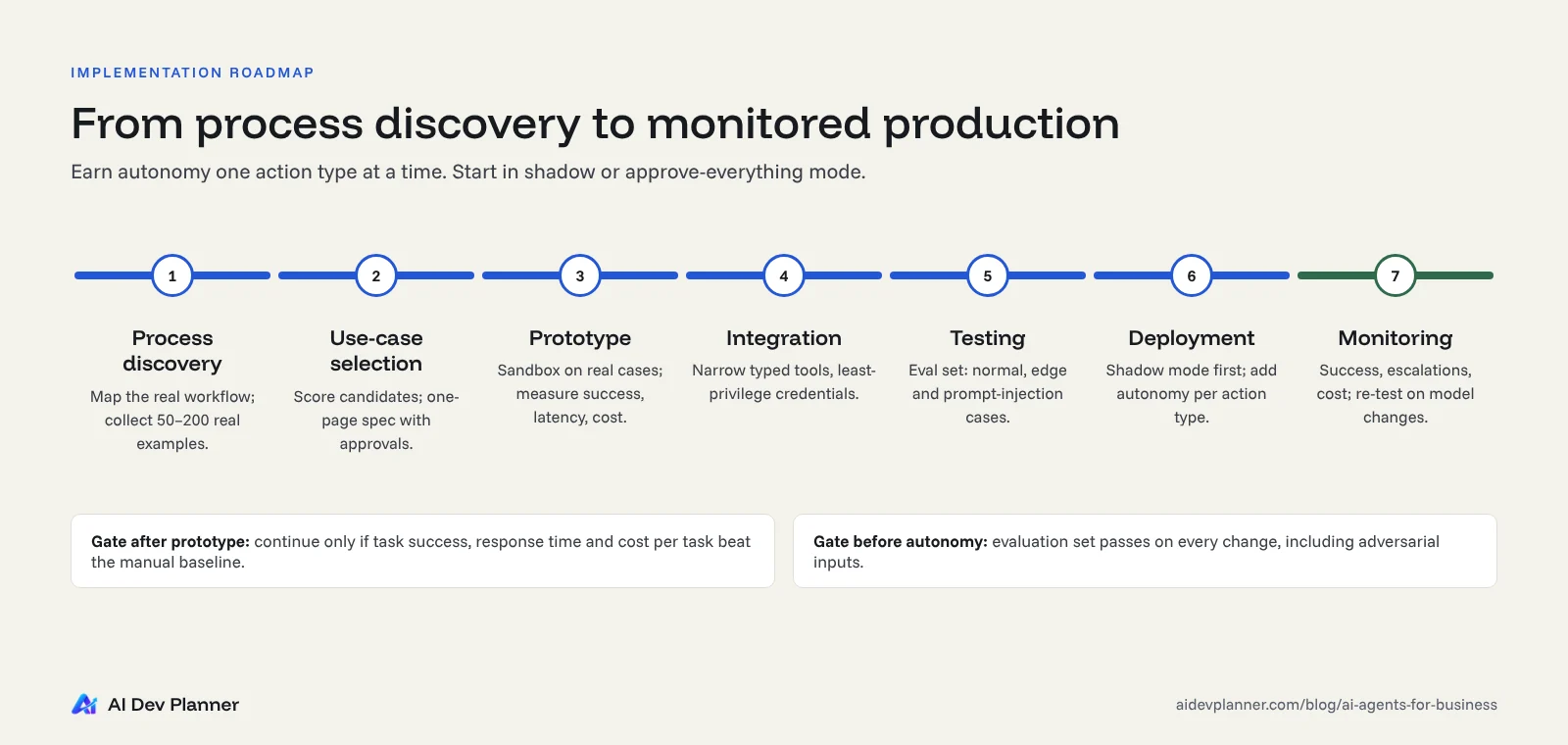
Process discovery. Map today's workflow as it actually runs. Time each step, list every system it touches, and collect 50–200 real examples, including the messy ones.
Use-case selection. Score candidates with the table above. Write a one-page spec covering the goal, allowed tools, blocked actions, approval points and the success metric.
Prototype. Build against real (de-identified where needed) examples in a sandbox. Measure task success rate, response time and cost per task before going further.
Integration. Connect to production systems through narrow, typed tools with least-privilege credentials. Our guide to enterprise LLM integration patterns covers the main architectural options.
Testing. Build an evaluation set: normal cases, edge cases and adversarial cases such as prompt injection hidden in an email or PDF. Run it on every change.
Deployment. Start in "shadow" or "approve-everything" mode. Increase autonomy one action type at a time as accuracy is proven.
Monitoring. Track success rate, escalations, cost and incidents. Re-run evaluations when the model version, data or tools change.
Timeline: a focused single-workflow pilot often reaches a measurable result in weeks, not quarters. Treat that as a planning expectation to validate during scoping, not a guarantee.
Security, privacy, reliability and governance
Agents take actions, so their failures are actions too. IBM's 2025 Cost of a Data Breach report found that:
13% of organizations reported breaches of AI models or applications.
Of those breached, 97% lacked proper AI access controls.
63% of breached organizations had no AI governance policy or were still developing one.
The average cost of a US breach reached $10.22 million (IBM, July 2025).
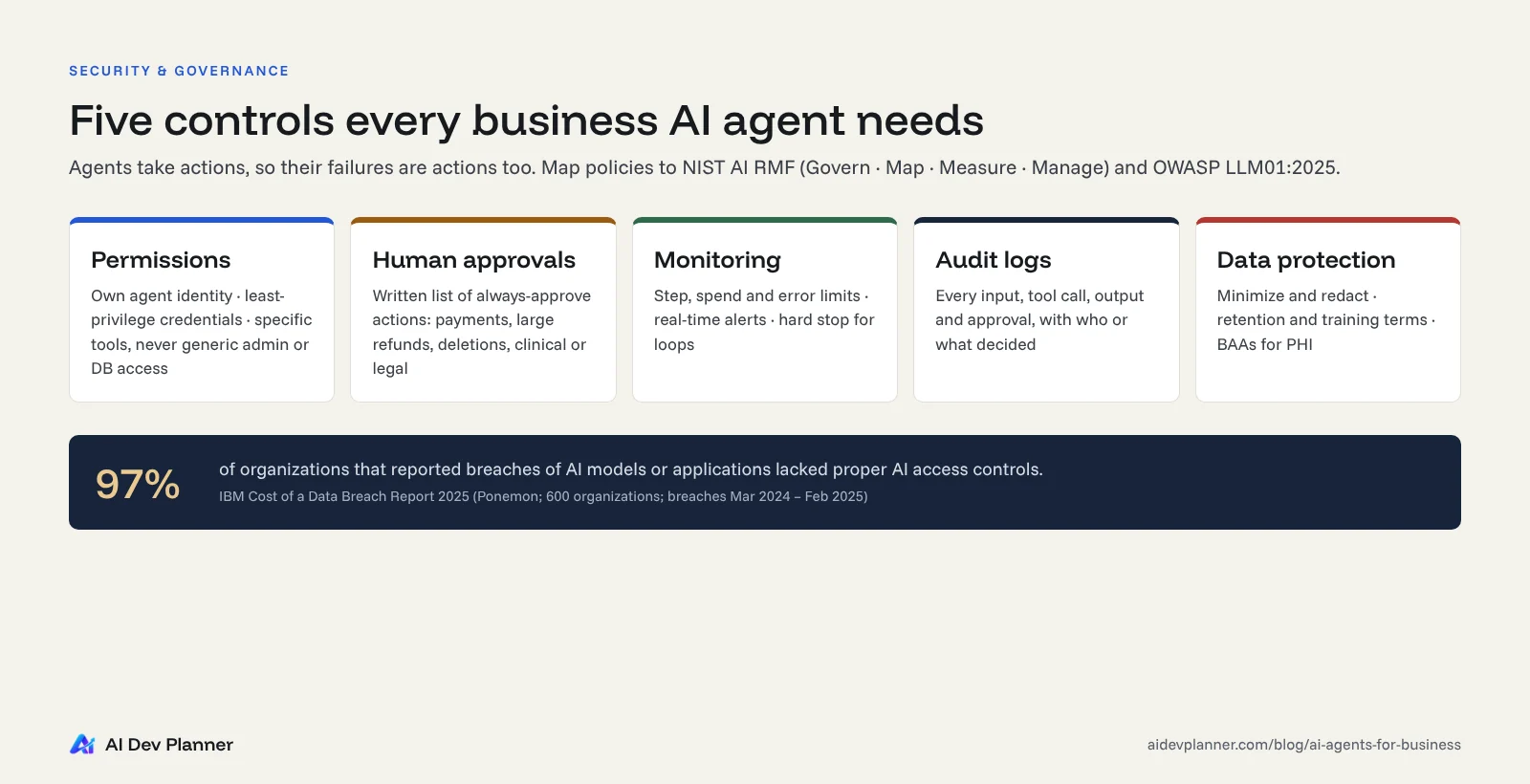
Five controls every business agent needs
Permissions (least privilege).
- Give the agent its own identity and the narrowest credentials that work.
- Expose specific tools, such as create_refund_request, never generic database or admin access.
Human approvals.
- Define, in writing, which actions always require a person: payments, refunds over a limit, account deletions, external messages to key accounts, anything clinical or legal.
- Use thresholds, not vibes.
Monitoring.
- Track step counts, spend, error rates and escalations in real time.
- Set hard limits so a looping agent stops itself.
Audit logs.
- Record every input, tool call, output and approval, with who or what made each decision.
- These logs serve debugging, compliance and dispute resolution.
Data protection.
- Minimize what the agent can see.
- Redact sensitive fields.
- Confirm data-retention and training terms with your model provider.
- Sign BAAs where PHI is involved.
Defend against prompt injection
OWASP lists prompt injection as the top risk for LLM applications in 2025 (OWASP LLM01:2025). Any email, document or web page your agent reads could contain instructions written to hijack it. The mitigations OWASP recommends match the controls above:
Least privilege
Validating outputs with deterministic code
Separating untrusted content
Human approval for high-risk actions
Use a recognized framework
The NIST AI Risk Management Framework and its Generative AI Profile give you a shared vocabulary (Govern, Map, Measure, Manage) for policies that leadership, legal and engineering can all sign off on.
When do you need custom AI agents instead of off-the-shelf tools?
Off-the-shelf agents built into your CRM, help desk or productivity suite are often the right first step. They're fast to switch on, and the vendor handles maintenance.
Consider custom AI agents when:
The workflow spans systems that no single vendor's agent can reach, such as your ERP, a legacy database and a partner API.
The logic is your advantage. Your pricing rules, underwriting criteria or service playbook is what differentiates you.
You need control over data and models. Data residency, HIPAA, audit requirements or the ability to switch model providers.
Per-seat or per-action pricing stops making sense at your volume.
You're building agents into your own product for your customers, the SaaS workflow above.
Stay with off-the-shelf when:
The workflow lives inside one tool
The volume is modest
Standard behavior is good enough
Many companies combine the two: vendor agents for standard tasks, plus custom AI integration work to connect them to internal systems.
How to choose an AI agent development partner
Gartner's warning about agent washing and project cancellations applies to service providers too. When you evaluate AI agent development services or AI automation services, ask these eight questions:
Will you define the scope in writing, including tools, blocked actions, approval points and success metrics, before we pay for a build?
How will you measure accuracy before launch? Ask to see an example evaluation report.
Which actions will the agent take autonomously, and which need approval? Who decided?
How do you handle prompt injection, least privilege and audit logging?
Who owns the code, prompts, tool definitions and evaluation data? Will they live in our accounts from day one?
What will it cost to run each month at our volume, and what happens to cost when volume doubles?
What happens when the model provider changes or deprecates a model?
Can you show relevant work? If the provider can't share client names, ask for anonymized architecture and metrics, and check how they were measured.
Be cautious of partners who:
Promise a specific ROI before seeing your data
Can't explain where humans stay in the loop
Quote only the build cost and leave out run and maintenance costs
The bottom line
AI agents for business are past the novelty stage in 2027, but they're not magic. They pay off when you:
Pick a high-volume workflow with a clear definition of "done."
Give the agent narrow tools and clear approval points.
Measure results against the manual baseline.
Start with one workflow, prove it in shadow mode, then expand autonomy one action at a time.
If you have a workflow in mind and want a second opinion on whether it's a good fit for an agent, AI Dev Planner can help:
Explore our custom AI agent development approach. We scope tools, limits and approval points in writing before any build.
An AI agent is software that uses a language model to complete a multi-step task toward a defined goal. It chooses which approved tools to use, takes actions in systems like your CRM or ERP, checks results, and hands off to a person when it reaches a limit or a high-risk decision.
What is the difference between an AI agent and a chatbot?
A chatbot answers or drafts in response to a prompt. An AI agent acts. It decides on and performs steps across your systems, such as updating records, creating tickets or preparing payments, within the permissions and approval rules you set.
Which business processes are best for AI agents?
Look for processes that combine high volume, unstructured inputs (emails, PDFs, chats) and a clear, checkable outcome. Common starting points are:
Lead qualification
Support triage
Invoice processing
Internal IT and HR requests
Order exception handling
Start with reversible, back-office actions.
Are AI agents safe to use with customer and financial data?
They can be, with the right controls. Those controls are:
Least-privilege tools
Validated outputs
Human approval for payments and other high-impact actions
Audit logs
Contractual data protections with your providers, including a BAA for health data
Without access controls, risk rises sharply. In IBM's 2025 report, 97% of organizations with AI-related breaches lacked them.
How long does it take to implement an AI agent?
A focused pilot on a single workflow can often show measurable results within weeks. Production rollout takes longer when it involves several integrations, compliance reviews or many task types. Plan for discovery, prototyping, evaluation and a shadow-mode period before full autonomy.
Do small businesses need custom AI agents?
Often not at first. Many small businesses get value from agent features already built into their existing tools. Custom agents make sense when a workflow crosses several systems, involves your own business rules, or costs more in per-seat fees than a tailored build would.
Planning an agent for one of these workflows?
We scope custom AI agents in writing, covering tools, approval points, limits and success metrics, before any build starts.
Statistics reflect the latest published research available when this article was written. Survey dates and populations are noted with each figure. Forecasts are labeled as forecasts.